
How it works

Install

Record

Save
Live Example: Chrome/EDGE Audio Capture Extension
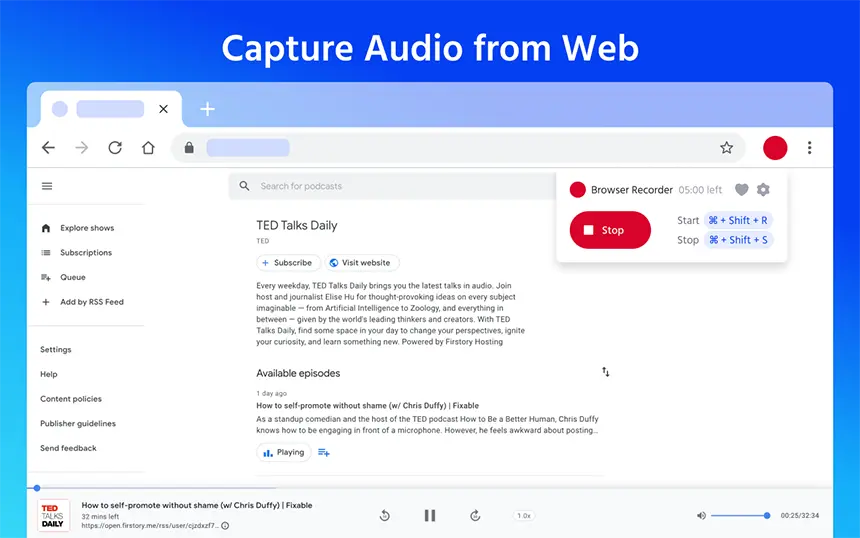
Demo video of the extension capturing audio from an active Chrome/EDGE tab.
Who Should Use This Browser Audio Recorder?
Web Audio Recorder (Chrome/EDGE audio recorder extension) is built for anyone who needs reliable, local tab recording — from podcasters to students and music lovers. It works as a browser audio recorder and a tab recording chrome extension for capturing streaming audio, internet radio, webinars and voice notes.
Music & Streams
Save streams, internet radio or sound from music websites. The extension records streaming audio from a Chrome/EDGE tab so you can archive or listen offline later.
Lectures & Webinars
Capture webinar audio and online classes — perfect for students who want to record lectures online and keep study materials as downloadable WAV/MP3 files.
Developers & QA
Capture browser tab audio for testing, demos, and documentation.
Podcasts & Interviews
Record live shows and remote interviews directly from the browser. Use the chrome/edge audio capture feature to save conversation clips in MP3 for editing or archiving.
Voice Notes & Tutorials
Create quick voice memos, software demo narrations or tutorials right in your browser — then export to MP3 for sharing or embedding in guides.
Everyday Users
Record important sounds from the web in just a few clicks.
Top Features of Our Chrome/EDGE Audio Capture Extension
A compact but powerful audio recorder for Chrome/EDGE tabs: record audio from a website, choose MP3 or WAV, set quality, and save all files locally. Below are key features that improve the recording process and convenience.
Browser Audio Recorder
Record sound directly from any active browser tab — capture audio from websites, streaming players, video calls and more without routing through external apps.
MP3 & WAV Output
Save recordings in MP3 for smaller files or WAV for lossless quality. The extension works as an mp3 wav recorder chrome/edge users can rely on for archival-grade audio.
Works on Any Website
Record audio from videos, music players, and online platforms.
Lightweight & Fast
Runs smoothly without slowing down your browser.
Adjustable Fidelity
Choose bitrate and quality presets — balance file size vs audio fidelity when recording streaming audio or music from web players.
Custom Record Length
Set a maximum duration (e.g., 20+ minutes) to automate stop times for longer sessions like webinars or radio shows. Works reliably as a tab recording chrome/edge extension.
What Users Say
“I use it to record online lectures. Works perfectly and saves files instantly.”
“Clean interface, no clutter. Just press record and it does the job.”
“Finally an audio recorder that works on any site without issues.”
Why Record Audio From a Webpage or Browser Tab?
Listen offline anytime, anywhere
Save important content before it disappears
Reuse audio for editing, studying, or sharing
Avoid screen recording when you only need sound
Web Audio Recorder turns any Chrome/EDGE tab into a powerful browser audio recorder. Whether you need to capture audio from a website, record music from a webpage, or save a webinar, recording directly in the browser is faster and more privacy-friendly than external recorders.
Common use cases include saving streaming audio for offline listening, archiving internet radio shows, clipping highlights from podcasts, and keeping lecture audio for study. Because the extension acts as a Chrome/EDGE audio capture tool, you get a one-click workflow: start recording, stop, then download MP3 or WAV — no uploads, no account required.
Practical tips: For best results record with a higher bitrate when capturing music or high-fidelity audio; choose WAV if you plan to edit in a DAW. Always respect copyright and Terms of Service of the source site — use recordings for personal use, archiving or with permission when required.
Short legal note: This tool captures audio from your browser for local use. Do not use it to infringe copyright or to distribute protected content without permission.
Guide: Chrome Audio Capture — How to Record Tab Sound
Web Audio Recorder is a lightweight browser extension that allows users to record Chrome tab audio and capture sound from websites without installing bulky software. It supports both Chrome and Microsoft Edge, saving recordings directly to your device in MP3 or WAV format.
Quick steps: install the extension from the Chrome or Edge store → open the tab you want to capture → click the extension icon → press Start → when finished, press Stop and download the file. The extension is optimized for streaming audio, online lectures, podcasts and browser-based calls.
Tips for Best Results
- Use WAV for editing (lossless); MP3 for smaller file sizes and easy sharing.
- Mute other tabs and system sounds to avoid accidental background audio.
- Increase bitrate when recording music or high-fidelity sources.
- For long sessions, consider splitting recordings into segments to avoid browser memory limits.
Frequently Asked Questions
Shift + R) to start, and stop with the toolbar or
Shift + S. You can also check the
live demo live-example.
